
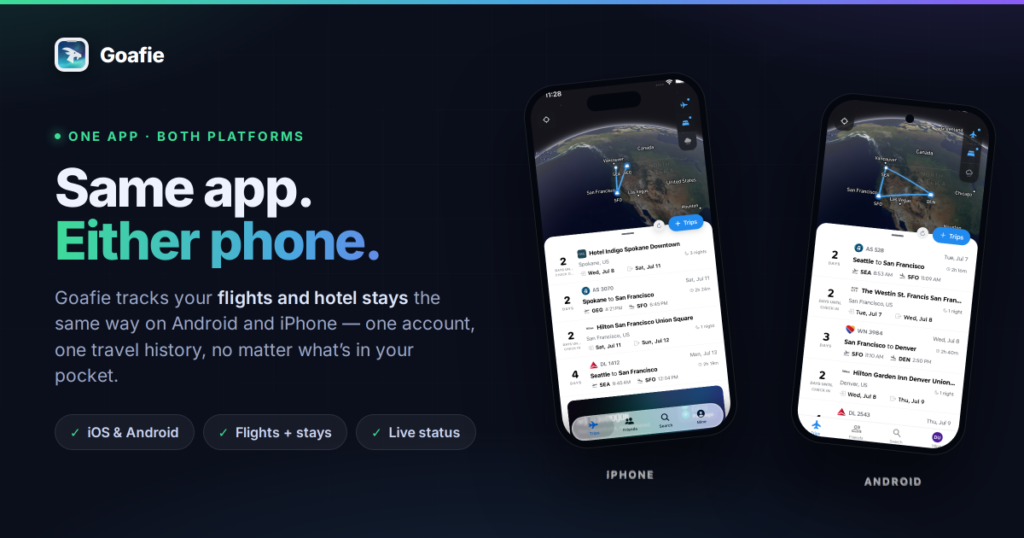
Quick answer: Goafie is a flight and hotel tracker that runs on both iOS and Android with the same features, the same account, and the same travel history on each. Flighty, the best-known flight tracker on iPhone, has no Android version and says it has no immediate plans for one. If you switch phones, share a household with someone on the other platform, or travel with a mixed-device team, Goafie is the same app for everyone. Get it on the App Store or Google Play.
There is a moment that happens at every airport gate. Someone says “what time are we actually boarding?” and three people pull out three phones. One has the airline app, which is showing a departure time that stopped being true forty minutes ago. One has a flight tracker that is excellent, and only exists on iPhone. One has a screenshot of an email.
The information exists. It is just scattered across devices that do not agree with each other.
We built Goafie so that the answer is the same no matter whose phone you look at. Not “roughly the same.” The same app, the same trip, the same live status, on Android and iOS both.
The problem: your travel history is hostage to your phone
Flight tracking on mobile has an odd shape to it. The most loved app in the category, Flighty, is genuinely very good — and it only runs on iPhone. Its own Android waitlist page is refreshingly blunt about why: the team says they do not have immediate plans for an Android version, because they would rather do one thing exceptionally well than spread themselves thin.
That is a defensible product decision. It is also a real problem if you are one of the roughly seven in ten smartphone users worldwide who is not on an iPhone — or if you are an iPhone user thinking about switching.
Because here is what a phone-locked travel app actually costs you:
- Switch platforms and you start from zero. Years of logged flights, the airports you have collected, the nights you have stayed — all of it lives in an ecosystem you just left.
- Your travel partner cannot see what you see. Couples, families, and colleagues rarely all carry the same phone. If your tracker does not exist on their device, you are back to forwarding screenshots.
- You end up running two systems anyway. One app for flights, another for hotels, a calendar for the rest. Nothing adds up because nothing is in the same place.
The fix is not a lighter Android port of an iPhone app. It is building both properly from the start.
What “consistent” actually means in Goafie
Plenty of apps ship on both stores. Fewer make them genuinely equivalent. Goafie is built from a single codebase against a single backend, so a feature does not exist “on iOS first” and arrive on Android two releases later — it ships to both at once.
In practice, that means all of this is identical on Android and iPhone:
- The globe. Your flights and stays render as routes and pins on a satellite globe, on both.
- Flights and stays in one timeline. A single chronological list of flight cards and hotel cards, not two separate tabs.
- Live flight status. Gate, terminal, delay, boarding, in-air progress, touchdown, baggage claim — the same status engine drives the same states on both platforms.
- Airport pages. Live local time, weather with flight category, gate maps, departure and arrival boards, delay trends, busiest routes and airlines.
- Aircraft detail. Tail number, aircraft age, model, a photo of the actual airframe, and where that plane has been earlier today.
- My Travelogue and stats. Miles, flights, airports, nights away, delay analytics, most-flown aircraft, most-stayed hotels — same numbers, same screens.
- Goafie Status. Passage, Compass, Meridian, Summit. Same thresholds, same season, same badge.
- Buddies. Friends, per-trip follows, friends on your flight, shared trip photos.
- Memberships. Airline, hotel, lounge, and car rental loyalty numbers with QR codes, surfaced on the right trip automatically.
- Calendar sync. Google and Microsoft calendars connect server-side, so they work identically on both platforms.
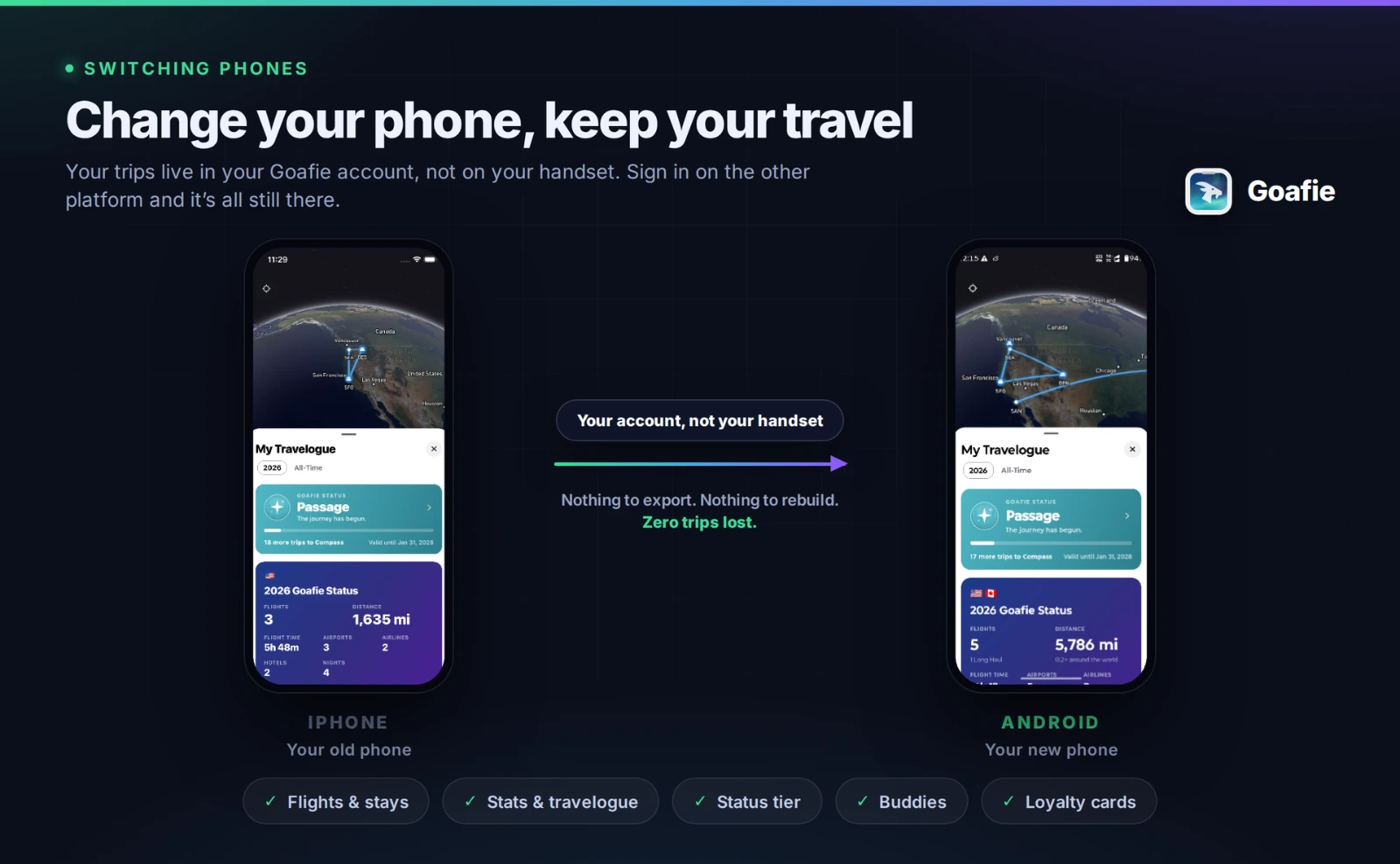
And because it is all one account backed by the same cloud, your travel record is not stored on a phone. It is stored with you. Sign in on a new device — including a device from the other ecosystem entirely — and everything is already there.
Goafie vs Flighty vs byAir
The two apps we get compared to most are Flighty on iOS and byAir on Android. Here is an honest look at where each one sits.
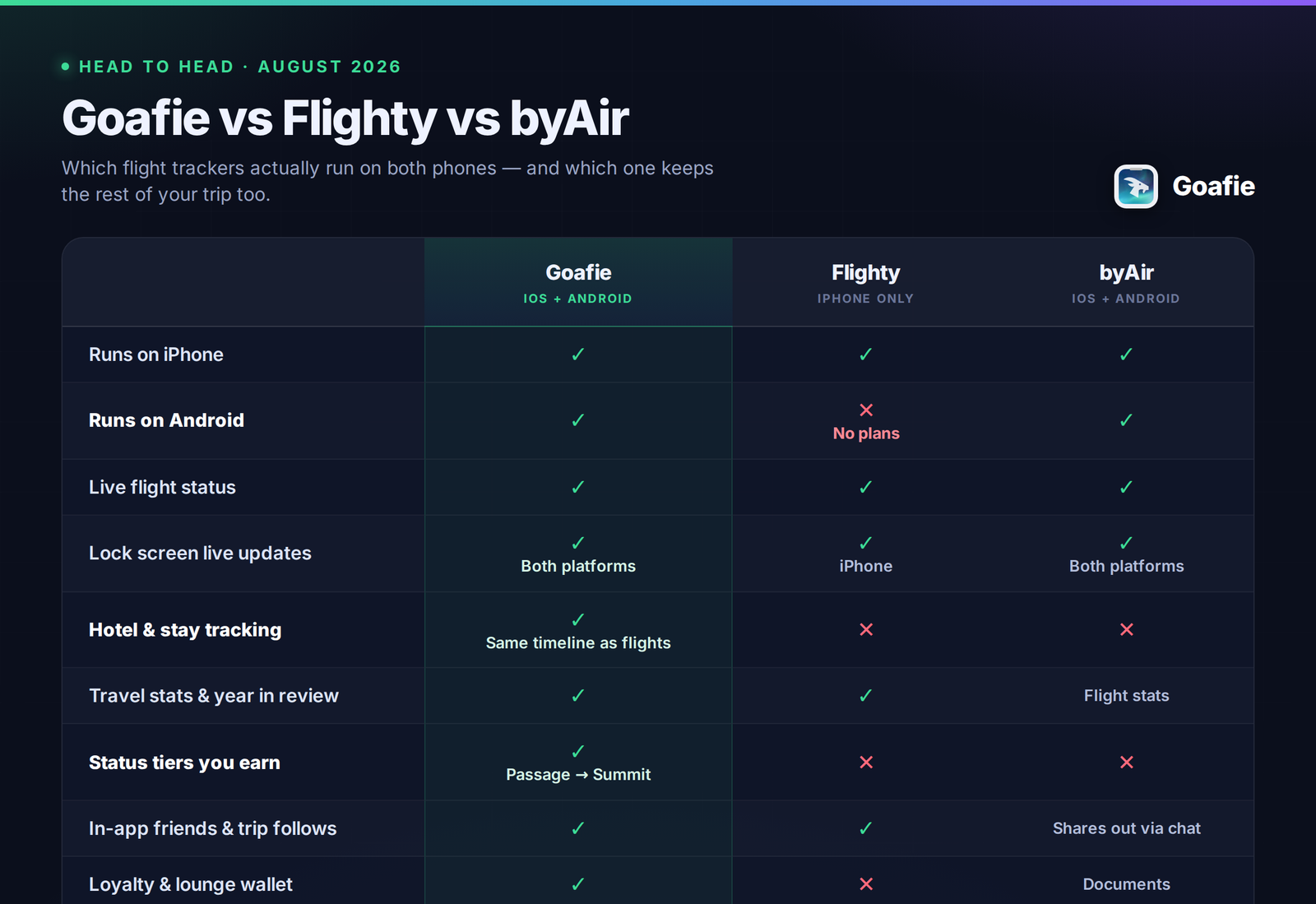
Competitor details from flighty.com and byairapp.com, checked August 2026. Features change — check their sites for current specifics.
The short version: Flighty is excellent and unavailable to most of the planet. byAir is on both platforms but it is a flight and airport app. Neither one tracks where you slept.
The bigger consistency: your whole trip, not just the flying part
Cross-platform is only half of what “consistent” should mean. The other half is that a trip is not just a flight.
You booked a flight, then a hotel, then maybe another flight home. That is one trip. Most tools split it across a flight tracker and a hotel confirmation buried in your inbox, which means nothing ever adds up.
Goafie puts them in the same list. Your Tuesday flight and your Tuesday-through-Friday stay sit in one chronological timeline, on one globe. Nights count toward your travel year the same way miles do. A stay contributes to your status tier the same way a flight does. When you look at your year, it is the whole year — 33 flights and 34 nights away, not one number in one app and another number nowhere at all.
That is the same on both phones too.
Where iOS and Android genuinely differ — and why we will tell you
We would rather be straight with you than claim a perfect tie. There are exactly three places the platforms diverge, and two of them are Apple and Google decisions, not ours.
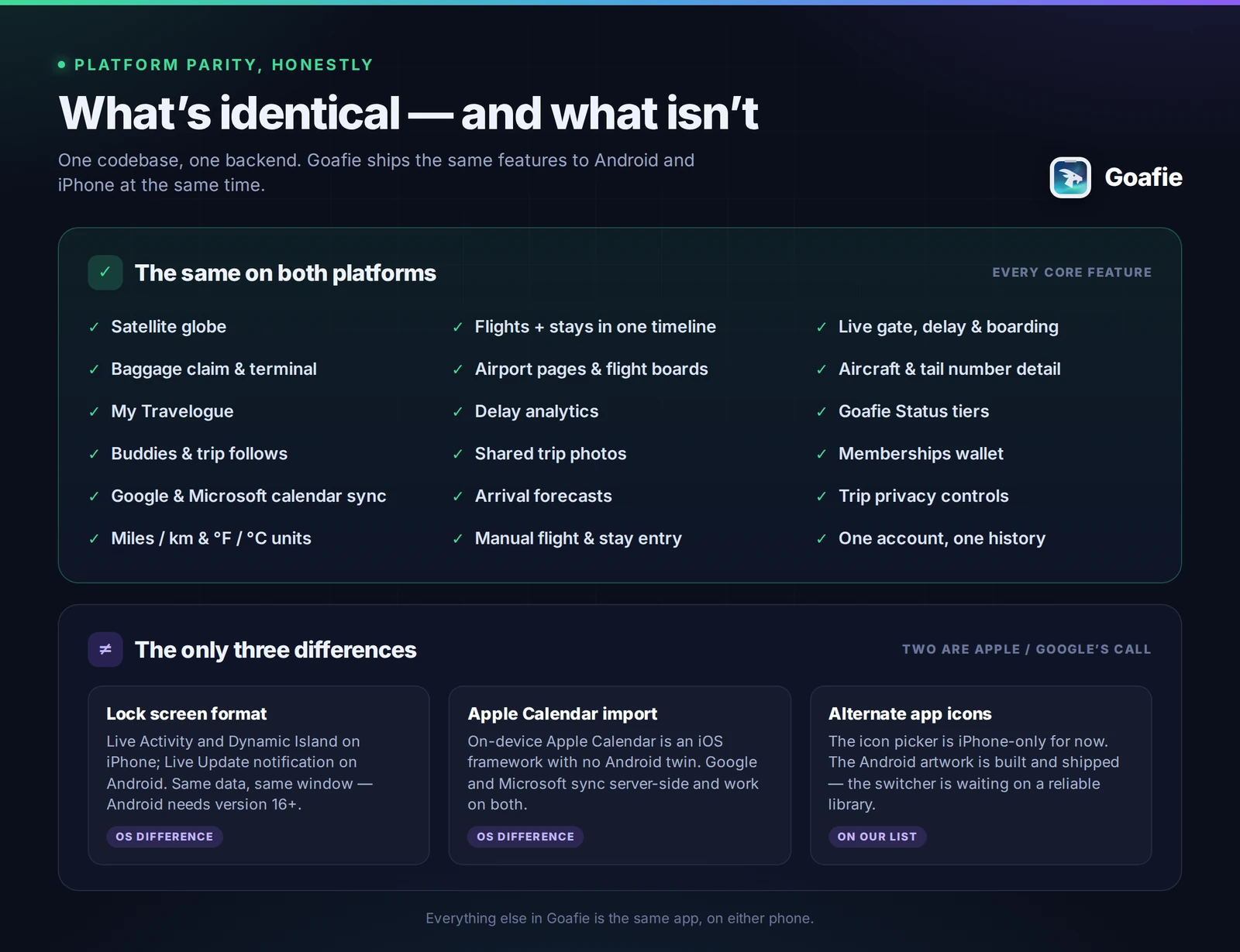
1. Lock screen live tracking looks different on each OS. On iPhone it is a Live Activity, with Dynamic Island support. On Android it is an ongoing Live Update notification, which is Google’s standard format for the same idea. Both start about three hours before departure and run until an hour after landing, both have the same My Flights and Friends’ Flights toggles, and both show the same live data. The one hard requirement: Android’s Live Update format needs Android 16 or newer. On older Android versions the rest of Goafie works exactly the same — you just do not get the lock screen card.
2. On-device Apple Calendar import is iPhone-only. That is EventKit, an Apple framework with no Android equivalent. It matters less than it sounds, because Goafie’s Google and Microsoft calendar connectors run server-side and work identically on both platforms — and that covers most people’s calendars.
3. Alternate app icons are iPhone-only for now. The Android icon-switching library we tried is unreliable enough that shipping it would be worse than not shipping it. The artwork exists; the picker is waiting on a fix.
That is the list. Everything else in the app is the same on both.
Who this is for
- You just switched, or you are thinking about it. Your travel history should not be a reason to stay on a phone you do not want.
- You and your partner carry different phones. Follow each other’s trips, see the same live status, from either ecosystem.
- You are on Android and tired of the good stuff being iPhone-only. You have searched “Flighty for Android.” We wrote a whole post about that.
- You travel for work with a mixed-device team. Everyone runs the same app and sees the same gate.
- You want one record of your travel. Flights and stays, in one place, that outlives any individual phone.
Frequently asked questions
Does Flighty work on Android?
No. Flighty is available on iPhone only. The company runs an Android waitlist and has stated it has no immediate plans to build an Android version.
Is Goafie the same app on Android and iPhone?
Yes. Goafie is built from one codebase on one backend and ships the same features to both platforms at the same time. The only differences are lock screen presentation (Live Activity on iOS, Live Update notification on Android 16+), on-device Apple Calendar import, and the alternate app icon picker.
Can I switch from iPhone to Android without losing my flight history?
Yes. Your trips, stats, status tier, friends, and loyalty cards are tied to your Goafie account, not to your device. Sign in on the new phone and everything is there.
Does Goafie track hotels as well as flights?
Yes. Hotel stays sit in the same timeline as your flights, on the same globe, and count toward your travel stats and status tier. Nights, cities, and countries are tracked alongside miles and airports.
Do lock screen live flight updates work on Android?
Yes, on Android 16 and newer, as an ongoing Live Update notification showing gate, delay, and boarding status from about three hours before departure until an hour after landing. On iPhone the same information appears as a Live Activity and in the Dynamic Island.
What is the difference between Goafie and byAir?
Both run on iOS and Android. byAir focuses on flights and the airport experience: airport guides, ground transport, documents. Goafie tracks flights and hotel stays as one trip, and turns your travel into a year-long record of stats, a travelogue, and status tiers you earn across everything you log.
Is Goafie free?
Goafie is free to download and free to start tracking your flights, hotels, stats, and status tiers. Goafie Pro is an optional subscription. Pricing is shown in your local currency in the app.
Which Android version does Goafie need?
Goafie runs on Android 7.0 and newer. Lock screen Live Updates specifically require Android 16 or newer; every other feature works across the full supported range.
One app. Whichever phone is in your pocket.
Your flights, your stays, your year in travel — tracked the same way on Android and iOS, held in an account that moves with you instead of with your hardware.
Download Goafie on the App Store · Get Goafie on Google Play
Free to download. Goafie Pro is optional.
New here? Read why we built Goafie, or what Android travellers have been missing.